Tuesday, May 7, 2024

Mercedes-Benz C230 2006 (W203) Android Stereo Installation with Steering Wheel Controls

Install off-market Android Stereo/head Unit with Steering Wheel Controls - Mercedes-Benz C230 2006 (W203)

Andriod Stereo Purchased on ebay : https://www.ebay.com/itm/395333341558

  • This device was received with CAN-BUS and did not need any other wring harness (Axxess or CRUX) for the steering wheel controls to work.

OEM Radio Removal : https://www.youtube.com/watch?v=gXNYunwBg_k

  • Thanks to youtube vidoes for guiding me on the removal of the radio

Issues faced : 

  • The stereo does not power up and had to twist the red and yellow cables together, turn on the key and press the power key of the unit to see whether turn on.
  • Steering Wheel Controls : Settings-factory setting-enter"1234"-protocol settings-OuDI OD-BZ-01 then choose the correct protocol brand and model
  • Currently the stereo is to be manually turned off and does not shutdown on the removal of the key. Working on it and will update the blog.


Monday, January 9, 2023

Sync Google Calendar with Microsoft Teams Personal

1. Login into your MS Teams personal account. 
2. Click on Activity and then the Settings icon to the right. 


3. From the Settings sub-screen, click the Calendar button.


4. click select to Connect gmail calendar to the right and authenticate.

Thursday, February 28, 2019

S/4 HANA : Settlement Management : Sales Rebates : Tax code via price determination cannot be determined, check Customizing : Message no. WS533, WS026

Issue : Execution of the settlement run to settle a standard rebate Condition Contract type, throws an error message,

1. During Automatic Settlement : Tax code via price determination cannot be determined, check Customizing with Message no. WS533.

2. During Manual Settlement : Enter a tax code Message no. WS026


Cause : This is due to to the configuration of the Settlement Document type and the issue could also occur if the standard document type is copied to create a custom Settlement Document type for specific requirement.

Resolution : Change the field "Handling of Missing Tax Code" filed to "No Error".


Settlement Run : Posting settlement document after configuration change and note that the settlement run was executed with Run Type : "X Check Run" and hence no settlement document number or FI document number has been generated.


Thursday, November 8, 2018

Debug a function module called in background task

The FM is called by using ABAP statement : Call Function <FM name> in Background task and a break-point is not triggered in the foreground during debugging if the break-pint is set inside the FM.

1. Execute TCode SM37 and input the FM.
2. Click Display icon and set up a break point at the Call Function <FM name> in Background task.
3. Inside the debugging screen - Menu - Settings - Change Debugger Profile/Settings - Check the flag for : TRFC (In background Task) Block Sending.


4. Execute SM58, select the tRFC and from menu EDIT -> debug LUW

Tuesday, August 29, 2017

Block Quantity Confirmation with Delivery Blocks at Schedule line

It's a known fact that if you enter the delivery block at header level, the system transfers the desired delivery quantity for all schedule lines in the requirement routine for Availability Check and the confirmed quantity is deleted, example Orders blocked for Credit Checks.

The same function is not available when the delivery block is set at schedule line level. This business scenario can only be achieved via custom development. SAP has provided an Enhancement 'ATP00001' which composes of two Function Exits. The user exit is triggered during order and delivery processing and implement this enhancement via CMOD. Use Function Exit EXIT_SAPLATPC_002, to clear/block the confirmation quantities when the order line item is blocked at schedule line level.

Note: Removal of the delivery block at the schedule line does not automatically confirm the line item quantities, the confirmation of the lines should be handled using the Backorder processing (TCode : V_RA). Please check my earlier blog on Backorder processing

Regards,
[V]

Monday, May 15, 2017

Execute Backorder Processing

I've seen a lot of Q&A session on the backorder processing and rescheduling and would like to discuss the backorder processing in this blog and would write up a follower for rescheduling.

Backorder processing as the name specifies is allocation and confirmation of quantity that has NOT been confirmed to a customer order prior, mainly due to absence of stock. Using Backorder processing, we could also override the quantities confirmed via "Product Allocation".

Rescheduling on the other hand is to remove already confirmed quantities of a customer order and reallocate it to another priority customer, which could also be due to shortage of stock  .

Note: The key configuration necessary for Backorder processing is the “Checking Rule for Updating Backorders”. The checking rule is determined based on the availability check maintained in the Material Master – Sales/General Plant tab per client requirements.
1.      Execute Transaction Code V_RA – Backorder scheduling. Note below that the cumulative confirmed quantity is Zero for both orders.
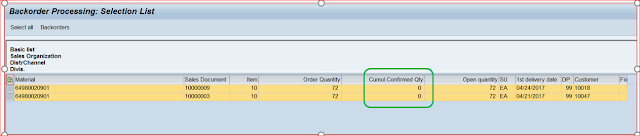


2. Both Orders are open and not blocked


3.  Select the line which want to allocate and confirm quantities. We could also select all the lines by clicking “Select all” button.
4. The selected line will be in blue in the below screen. Select the line and Click “Change Confirmation" at the top.


 5.      Enter the quantity you want to confirm in the ‘Committed” field at the bottom left screen.


Note: Click on the Back icon on the screen and the system will prompt to “Copy the confirmation” and Click the Yes button.
      6. On Clicking the Yes button, the confirmation quantity is copied to the order line. Note the cumulative confirmed qty has been changed to 20.

7.   Open the order and check the schedule lines, and you should notice the order has been for 72 qty and confirmed for 20. The remaining 52 qty will still be on backorder.

Tuesday, February 21, 2017

Sales - Sales org 2 View: Activate Material Groups 1 – 5

TCode OMSR: The Field selection group is assigned to each field
     
TCode OMS9
Enter Field Select Group = 54 and hit Enter
Select “by field Selection” in the Sort Entries at the bottom left corner
Select Radio Optional for TCodes MM01, 02 & 03


Wednesday, October 26, 2016

Attach external documents to SD Documents

Requirement: Attached external files (Word/PDF/xls) to SD related documents like Customers, Sales Orders, Deliveries or Billing Documents.

Pre-requisite: Use TCode SU3 to assign and set parameter ID SD_SWU_ACTIVE to X.


SD_SWU_ACTIVE
Solution: There are two ways to navigate in the Document screen and see screens below to attach files and note that the file can only be attached in the Change Display mode and NOT in Create mode.

Option-1


Option-2


Regards
[V]


Saturday, October 22, 2016

Product Allocation : Product allocation check found changes to the confirmation


Issue :  Product allocation check found changes to the confirmation and the confirmation quantity is 'Zero'.


Solution : This issue occurs if a custom info structure is created with characteristics other than that of the standard product allocation structure S140. In such case, program User_Exit FV45VFZY, Include  USEREXIT_QUOTA_KEY_VALUE to pass custom characteristics from LIS to be filled and pass to internal LIS structure.


I have a Custom info structure created and notice from the above debug screen that the Material group and Material number fields are not filled. With appropriate code in place fill the custom fields to pass data to MCVBAP (LIS Item level info structure). The data from  these structures performs a check against the SXXX structure maintained for product allocation and confirms the quantities. 


Tuesday, October 11, 2016

S4 HANA Customer Master Sales Area Data - Changes to BP are not saved

Issue
Changes to BP are not not saved when we extend the BP data to Sales Area even though you see the message "Changes have been saved" without any other error message. However, if you open the BP again, you will notice that the changes actually are not saved to database.

Cause
What I noticed is that if there are some mandatory fields that are required to save the data, but there are no errors are displayed during the 'Save' of the document.

Resolution
1. Execute TCode MDS_PPO2.
2. Input the Technical Creation date (date you actually performed the changes) in the selection screen.
3. Check if there is any error in the PPO log. If there is error, please correct them then perform the change on BP again.

Source : SAP

Monday, October 10, 2016

Service Order Material Bill of Material Explosion - Components Tab (IW31/IW32)


Requirement: 

  • Display the list of components required/relevant for an equipment in a repair service Order


Solution: 

  • Use TCode CS01 to create a Bill of Material with Usage-4 (Plant Maintenance).
  • During the creation of the Service Order (IW31/IW32), Click the 'Operations' Tab, and then click the General tab and bottom left of the screen.
  • Enter the BOM material created from CS01 in the 'Assembly' field and hit Enter.
  • Click the 'Assembly' Icon to the bottom of the Screen.

Wednesday, August 24, 2016

SAP Sales Rebates vs Vistex Sales Rebates (Sales Rebates)

Below are a few differences between SD rebates and Vistex, Vistex has evolved over a period of time and the product has matured based of organizational requirements unlike SD rebates is at a stand still.

In short, SD Rebates can be implemented for organizations for simple rebate processing and low document volume, whereas Vistex handles complex business processes with very high data volumes.
Processes
SAP Rebates
Vistex
Flat Rebates
  • Handles simple and straight forward requirements.
  • Simple to Configure and Maintain
  • Tracking is very easy
  • Partial settlement Possible by default
  • Medium level configuration but provides multiple called transnational model
  • options and screens for additional maintenance.
  • Tracking is also simple but complex config.
  • Additional config to handle Partial settlements
Scales or Tier Based
  • Limited functionality where accrual is per document
  • No functionality exists for volume, growth or target based rebates
  • Complex, called composite model and can handle excellently
  • Examples include growth based, volume based,target based rebates
  • The most robust feature of Vistex and complex maintenance on the other hand.
Rebate Recipient
  • Payment to only one recipient
  • Payments can be made to multiple recipients
Reports
  • Limited functionality
  • Customer reports for specific requirements
  • Standard reports available
  • Customer reports for specific requirements
  • Vistex provides standard BI extractors
Accrual Process
  • Easy to trouble shoot
  • Complex 
Retroactive
  • Execute a report to correct data
  • Implement a functionality to handle retroactive rebates.
  • Process the invoices for subsequent IP processing
Accrual Postings
  • Posting to FI based on service rendered date
  • Posting to FI on billing date
Currency Conversion
  • Posting based on service rendered date by default
  • Posting based on billing date
Credit Memo generation
  • Creates SD billing document by default. 
  • Payments made only to recipient which is normally a customer
  • Default config to create direct FI invoice
  • Custom development to process for SD billing. 
  • Can make payments to customer or Vendors as per business requirements via config.
Re-process documents
  • Cannot re-process/change once billing document has been created
  • Easy to troubleshoot
  • Can reverse FI postings like accruals
  • mainly and re-price/re-create documents
Exclusions
  • No material or customer exclision from group if rebates maintained at group level
  • Handled by standard configuration
Customer & Material Groups
  • Customers and materials are grouped at master data level
  • Ability to group customers via Membership lists for customers or Product lists/ Flexible grouping for Materials.
Buying groups or GPO's
Note: There are situations when the rebates are to be processed for a buying group who does not actually purchase the products but gets a royalty for introducing customers to manufacturers.
  • No standard functionality exists.
  • The invoices can be process separately for buying groups and individual customers.
  • Accural/settlements can be handled accordingly.
Stop Rebate payments
  • Manual check for Customer AR Clearance. 
  • Cannot stop payments to customers even if customer AR due. 
  • Vistex Payment schedule process handles payments
  • Ability to stop accural if AR not cleared.
Manual Claim process
  • Standard process part of rebate configuration
  • Additional configuration to handle manual claims for positive and negative postings 
Sales Commissions
  • Normally clients use the SAP rebates module and generate credit memos for payments
  • Vistex Payroll profile integrates with HR and payments processed from HR module as part of Payroll

Note: Vistex provides additional modules such as Chargebacks, billbacks, Sales Commissions, Purchasing Rebates and Data Maintenance module (Price optimization tool) that have been implemented by clients for business specific requirements.

Thursday, August 4, 2016

SAP Revenue Accounting and Reporting (RAR) - Definitions or Keywords

Operational Document: It represents a contract that an enterprise has with its customer to deliver goods or service within a stipulated time. This could traditionally represent a sales order/delivery/invoice.

Transaction Price: This is the price of the item determined in the operational document (Sales Order/Invoice) via pricing conditions and cannot be maintained within Revenue Accounting
Stand Alone Selling Price: This is the ‘fair value” price of the distinct item when sold individually which can be maintained in the operational document or within Revenue Accounting.

Revenue Contract: This is an automatically generated number created within Revenue Accounting. This number could be unique per operational document (Sales Order) or a combination of operational documents. The subsequent processing of the operational document (Delivery or Invoice) will update the same Revenue Contract.

Performance Obligation (POB): This is a promised item in the contract to the customer to deliver transfer goods or perform service. It is also an automatically generated number created within Revenue Accounting under the contract.

Distinct or Indistinct: Distinct POB is goods or service always sold by itself independently and Indistinct POB’s are goods or service that are combined with other items and does not need individual tracking.

Note : Source SAP Help

Wednesday, August 3, 2016

SAP Revenue Accounting and Reporting (RAR) - Introduction

SAP Revenue accounting and reporting, RAR in short is an SAP delivered software designed specifically to help businesses comply with new statutory IFRS revenue standard (ASC 606) for revenue recognition and also has the flexibility to support existing requirements. 

Revenue Accounting can be installed on SAP ERP 6.0 Enhancement Package 5 or higher. If your Financials system is below that system level, you must first upgrade the system to at least SAP ERP 6.0 Enhancement Package 5 and install integration on top of your ECC system.

Revenue Accounting Integration and Revenue Accounting communicate by using RFC function calls. If these two instances are installed in different systems, you need to define an RFC destination with connection type 3 (Connection to ABAP System) in the system where Rev. Accounting Integration is installed, pointing to the system where Revenue Accounting is installed.

The new SAP RAR has been decoupled from the SAP SD  environment and the revenue account process runs in silos with some integration configuration within SD area and involves five basic steps.

1. Identifying the contract
2. identifying the performance obligation
3. Allocation of Transaction Price
4. Fulfillment of performance obligations
5. Revenue Postings

Note: Source from SAP Help

SAP SD Integration with SAP Revenue Accounting and Reporting (RAR)

  • SAP RAR engine has provided three default Revenue Item classes (RAI) one each for Order, Delivery and Invoice documents.
  •  RAI Class contains interface program and data base tables ​ and RAI data base tables hold the raw, processable or processed data from source systems​.
  • Class Type relates RAI Class to Interface Component​
  • Custom Revenue item class are used either for conversion or data flow from external systems (Non-SAP) when integrating with SAP RAR for its revenue recognition purposes and Generate and Activate RAI Class for any non-SAP Systems.
  • These item classes act as interface points and help the data flow from ECC to SAP RAR alongside some other essential configuration.
  • Interface Component contains data structures, interface programs and possible program enhancements
Note: Source from SAP Help

Tuesday, December 8, 2015

SAP Intercompany Billing : Automatic Posting to Vendor Invoice (SAP-EDI)

EDI outbound processing for intercompany billing links to EDI (Output Type RD04 for billing type IV for Intercompany Billing Revenue and IG for Intercompany Credit Memo/Returns) inbound processing for invoice receipt in FI and posting to vendor account is carried out in the selling company code. The EDI then creates a BDC job to trigger an FI posting using FB01 with an IDOC.
When posting the Vendor Invoice there is one key configuration that is necessary for the copying of the Profit center, Cost center, projects, PA Segment or Business Area for the Vendor Invoice to be posted automatically and that is to "Activate the Account Assignment" using menu path in SD Billing or simply via TCode VOFC.


The indicator specifies whether account assignments from the customer billing document are copied during credit-side offsetting entries in the sales company code. Only on checking this flag, the IDOC E1EDP30 with QUALF "046" for PA Segment, "078" for Profit center or "049" for Business area are populated and this data is used to populate some mandatory fields for the Vendor Invoice creation.
