Saturday, August 17, 2013

Windows 7 - Icon images missing

During installation of certain programs or a Windows Update, it happens that the icon images go missing and you see a common image for Word or Excel or power point and certain other programs. The resolution I found was to rebuild the Icon Cache, which I learned worked for many but for me. 

The re-installation of the program, for example the Skype icon went missing and after the re-install the icon was restored. 


But the same did not work for Microsoft Office and the re-installing/setup did not work for some unknown reason or a corrupted registry. 


The solutions I found was to use the Microsoft 'Fix it'.Use the below link
http://support.microsoft.com/kb/290301

http://support.microsoft.com/mats/Program_Install_and_Uninstall

This program restores the registry and a re-installation of the Office word, restored the missing icons. Use the same program to restore any other failing installations where an .msi file goes missing.


Regards,
[V]

Monday, October 17, 2011

Lenovo T410 : Connect T410 to TV via HDMI

As many of the Lenovo thinkpad fans know we do not have S-Video cable to connect to the TV or neither a male to male HDMI works. After some serious search I finally was able to connect my T410 to my Samsung. The T410 or I believe any IBM/Lenovo laptops can be connected to a TV via the Display port-male To HDMI-male Adapter. I made a purchase over Amazon and see link below. Sometimes or initially only the video might play and there might not be any audio. In my case, I own a Lenovo T410 and the Fn+F6 key opens up the Communication Settings.

Select the "Audio Defaults & Settings" and you shall see two options, the default is the 'Speakers' and the second option might vary according to the TV. The second option is visible only if the laptop and TV are synced. If you happen to have no video, you just might need to switch the TV off and switch it back after about 10secs, else the laptop might need a re-boot. Performing one of the two actions (the TV one as you know is better) will display the second option for sure.

I guess many of them might have found an answer to this but I thought this might be helpful to a few.

http://www.amazon.com/gp/product/B001TUZ6EU/ref=wms_ohs_product

Regards,
[V]

Friday, September 9, 2011

Adobe Acrobat Crashes Automatically

The below solutions worked for me and thanks to user CravenIT from Adobe forums. Here is the solution. This was a hard solution to find.

Source: http://forums.adobe.com/thread/879048

1. Go into your registry editor (Run >> regedit)
2. Go to Hive [HKEY_LOCAL_MACHINE\Software\Policies\Adobe\Acrobat reader\10.0\FeatureLockDown]
3. Right click >> go to New >> DWORD
4. Give it the name "bProtectedMode"
5. Hit okay. Close Regedit. Win.

Thanks
-V

Tuesday, May 3, 2011

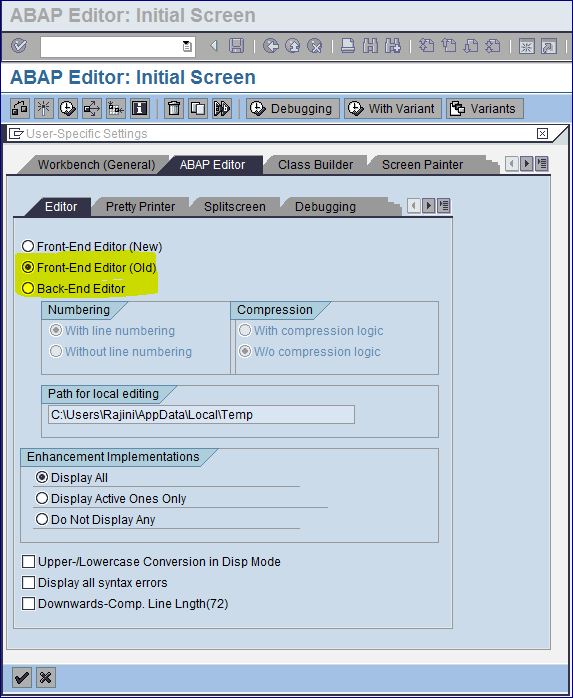
Cannot view/see ABAP code?

Go to ABAP Editor SE38.
From the Menu -> Utilities -> Settings
Check the ABAP Editor Tab and within that check the Editor Tab.
Now select the old front end editor or back end editor.

Tuesday, December 21, 2010

Windows 7 does not shutdown

Dear All,


I have recently encountered this problem with my Lenovo T410 laptop where the system would not shutdown even when left out over night. I use my laptop for work and the problem was caused due to third party softwares that were installed on my system to access outisde networks.


I tested this couple of times with installing these softwares and restoring the system to previous good configuration. I have searched the web for solutions and found no solutions as this might have been a generic issue. I think this is a problem with the third party software that does not support the Windows 7 OS and hope to hear from the software provides or Microsoft for a hotfix.


During the same process I lost functionality wherein my system would not connect an external hard drive and could not wake/recover from sleep mode. FYI Fn+F4 key is used to wake the system (Lenovo T410) from sleep mode.


[V]